
Introduction: The Number You Have Never Actually Calculated
If your systems went down for an hour tomorrow morning, what would it cost your business?
When asked this question, most Dutch business owners and IT managers pause. Then they give a number — usually a rough guess, and almost always too low.
This is not a careless oversight. It is a structural problem. The costs of IT downtime do not arrive on a single clean invoice. They scatter quietly across your working day: an invoice that cannot be sent, a client call that cannot be taken, a team of ten people sitting idle waiting for the server to come back online, a prospective customer who tried to reach you at exactly the wrong moment and did not try again.
According to research by Computable, the average ICT incident costs a Dutch business €82,838 — made up of roughly €58,400 in operational disruption and a further €24,438 in recovery costs. For MKB businesses specifically, Dutch market research puts the average loss at €1,500 per hour of IT downtime. The actual number for your business may be higher. The point is: you should know your number, not guess it.
This blog walks you through a straightforward four-step calculation you can complete in under ten minutes. No complicated spreadsheet. No consultancy required. Just a clear method for putting a real figure on a risk that most businesses quietly underestimate.
Why this matters in the Netherlands specifically:
Over 70% of Dutch MKB businesses now rely on external IT support or cloud services (CBS, 2024). As digital dependency increases, so does the risk of downtime. An hour of outage that would have been a minor inconvenience five years ago now carries real financial weight — and that weight is rising.
Why Downtime Is Almost Always Underestimated
The reason most estimates are too low is structural, not deliberate. Downtime costs do not appear as line items. Nobody sends you an invoice that reads “operational loss due to server outage: €4,200.” The costs hide in places that are easy to overlook.
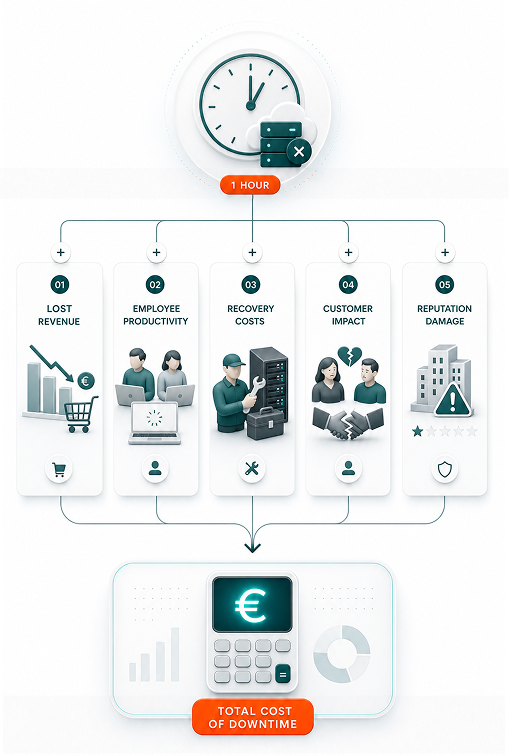
There are four categories to account for, and most people only think about one or two of them:
- Lost revenue: The income your business cannot generate while systems are offline — orders unprocessed, deals that cannot close, services that cannot be delivered.
- Idle employees: Staff who are paid but cannot work. This is the most visible cost, and the one most people do at least partially account for.
- Recovery time: The extra effort and cost after systems come back online — catching up on backlog, re-entering lost data, communicating with clients who were affected.
- Customer impact: The hardest to quantify, and often the most expensive over time. Clients who needed you during the outage and did not come back.
Each of these is real. Each is calculable. And together, they produce a number that most business owners are surprised by when they see it written down.
Step 1: Calculate Your Lost Revenue Per Hour
Start with the most direct cost: the revenue your business cannot generate while systems are unavailable.
The calculation
Lost Revenue Per Hour
Annual Revenue ÷ 2,080 working hours = Revenue Lost Per Hour
Example: A Dutch accountancy firm with €1.5M annual revenue loses approximately €721 in revenue every hour systems are down.
The figure of 2,080 represents the approximate number of working hours in a Dutch business year (52 weeks × 40 hours). If your business runs fewer hours or has seasonal peaks, adjust accordingly.
This is a conservative baseline. It assumes revenue loss is evenly distributed across all hours, which is rarely true. If your systems go down during your busiest period — end of quarter, a Monday morning, a product launch — the actual loss will be higher.
Important nuance for service businesses
If your business delivers time-based services (legal, consulting, accounting, IT services), the revenue loss per hour is more direct: it is the billable time your team cannot log. For a 10-person consultancy with an average billing rate of €120 per hour and 70% utilisation, that is €840 per hour of lost billable capacity before you account for anything else.
Your number: €_______ in lost revenue per hour
Step 2: Calculate the Cost of Idle Employees
While systems are down, your team is not sitting doing nothing — they are trying to work around the problem, waiting for updates, or simply unable to do the work they are paid for. All of that has a cost.
What it should look like
Tech issues are resolved before you hear about them. Problems are logged, triaged, and fixed through a defined support process. Your team knows where to go for help, and it is not your mobile number.
The calculation
Idle Employee Cost Per Hour
Employees Affected × Average Hourly Cost (wages + employer costs) = Idle Cost Per Hour
Using CBS 2024 data: average Dutch labour cost is approximately €47 per worked hour, including employer contributions.
A few points worth noting:
- Not all employees are equally affected. A server outage may ground your finance team entirely while your warehouse staff carries on. Be specific about who actually cannot work when which systems fail.
- Employer costs in the Netherlands include social security contributions, pension contributions, and employer insurance — typically adding 25–35% on top of gross wages. The €47 per hour figure from CBS already accounts for this, making it a useful starting point.
- If your business has staff across multiple locations or departments, consider running this calculation per team and adding up.
Your number: €_______ in idle employee costs per hour
Subtotal so far:
Add your lost revenue per hour and your idle employee cost per hour. This is your base downtime cost — before recovery or customer impact. Write it down. Subtotal: €_______ per hour
Monthly tech tips for SMBs
Quick, useful tech tips to help your business run better. We don’t send often — but when we do, it’s worth opening.
Step 3: Apply the Recovery Multiplier
This is the component most people miss entirely, and it changes the number significantly.
When systems come back online after an outage, things do not simply resume where they left off. There is a recovery period: backlogged work to clear, data to re-enter, client communications to catch up on, and a team that spent the outage stressed and context-switching rather than focused on productive work.
A standard rule of thumb used in IT continuity planning is to add 50% to account for recovery overhead. A one-hour outage rarely costs just one hour — it costs approximately 1.5 hours of total disruption.
The calculation
Total Downtime Event Cost
(Lost Revenue + Idle Employees) × 1.5 = Total Cost Per Outage Hour
This multiplier accounts for recovery overhead: backlog clearance, data re-entry, client communication, and team productivity lag post-incident.
If your subtotal from Steps 1 and 2 was €2,000 per hour, your realistic downtime cost is €3,000 per outage event. Not because systems are down for 1.5 hours, but because the disruption extends beyond the outage window.For longer outages — multi-hour or multi-day — the recovery multiplier often increases. A four-hour outage may carry a recovery overhead of 100% or more, particularly if it involves data loss, client escalations, or manual workarounds that need to be unwound.
Your number: €_______ total cost per downtime event (subtotal × 1.5)
Step 4: Factor In Customer Impact
This is the most difficult component to assign a number to, and often the most significant over time.
Consider what happens on the client side during an outage. A customer calls to place an order and gets no response. A prospect visits your website to get in touch and hits a dead end. A client who relies on your portal to access documents finds it unavailable at a critical moment.
Some of those people wait. Many do not. And the ones who do not wait rarely send a note to tell you they are leaving.
How to think about this
Rather than trying to calculate an exact figure, ask yourself two questions:
- What is the average lifetime value of a client to your business? Even a conservative estimate — say €5,000 over two years — gives you a reference point.
- How many clients or prospects might have a critical interaction with your business during a one-hour outage? On a busy Tuesday morning, the answer might be three or four.
One lost client relationship at €5,000 lifetime value doubles the cost of an outage that otherwise came to €4,500 in revenue and staff costs. Two lost clients triple it.
This is not a hypothetical. Research on IT service disruptions consistently shows that customer churn following outages is both real and systematically underestimated — in part because it is invisible. Clients do not usually call to cancel. They simply stop coming back.
The question worth sitting with:
What is one lost client worth to your business over 12 months? Over three years? Write that number down and consider it alongside your calculated hourly downtime cost. Together, they tell a more complete story about your actual exposure.
What Does This Look Like in Practice?
Here is a worked example based on a typical Dutch MKB business.
Example: 20-Person Professional Services Firm, Amsterdam
Annual revenue: €2.4 million | Employees: 20 | Average labour cost: €47/hour
Step 1 — Lost revenue:
€2,400,000 ÷ 2,080 hours = €1,154 per hour in lost revenue capacity
Step 2 — Idle employees (15 of 20 affected):
15 employees × €47/hour = €705 per hour in idle labour
Subtotal:
€1,154 + €705 = €1,859 per hour
Step 3 — With recovery multiplier (×1.5):
€1,859 × 1.5 = €2,789 per outage event
Step 4 — Customer impact:
Average client lifetime value: €12,000. Even one client lost per incident adds €12,000 — more than quadrupling the direct cost.
Total realistic cost of one hour of downtime: €2,789 direct + significant customer risk upside.
Now ask the question that follows: how many hours of downtime would it take to cost more than a full year of managed IT support? For this business, the answer is likely fewer than two incidents.
What the Number Reveals That Most Businesses Miss
Running this calculation for the first time tends to produce a specific reaction: surprise at how large the number is, followed immediately by the realisation that the business has never thought about IT investment in these terms.
Most technology purchasing decisions in Dutch SMEs are made based on cost. How much does it cost per month? What is the cheapest option that covers our needs? These are reasonable questions. But they are incomplete without the denominator: how much does an outage cost, and how often do outages happen without proper infrastructure in place?
The frequency issue
Dutch businesses are not outliers when it comes to outage frequency. Research from the Uptime Institute shows that 80% of organisations experienced at least one significant outage in the past three years. Network and connectivity issues account for 31% of all IT service outages. Hardware failure, software errors, and — increasingly — cybersecurity incidents make up most of the rest.
For MKB businesses in the Netherlands, the cybersecurity dimension is particularly relevant. Ransomware attacks on SMEs occur at more than double the rate of large enterprises, according to the 2025 Verizon Data Breach Incident Report. The average recovery time from a ransomware incident is 24 days — not 24 hours. Multiplied against even a modest hourly cost, the financial exposure becomes significant.
The hidden cost of the "cheap" approach
When businesses choose IT infrastructure or support based on minimum monthly cost, they are making an implicit bet: that outages will be infrequent and short. Sometimes that bet pays off. Often it does not. And when it does not, the reactive cost — emergency contractor fees, data recovery, extended downtime while the problem is diagnosed — typically far exceeds what proactive monitoring and managed IT support would have cost over the same period.
As one Dutch IT provider puts it: “Een uur downtime bij vijf medewerkers kost al snel meer dan een maand onderhoud.” (One hour of downtime with five employees costs more than a month of maintenance.) The maths tends to bear this out.
How to Reduce Your Exposure: Practical Steps
Knowing your downtime cost is only useful if it informs a decision. Here are the practical steps Dutch SMEs can take, broadly in order of priority:
1. Know your most critical systems
Not all downtime is equal. An outage affecting your email is inconvenient; an outage affecting your payment processing or client portal is immediately costly. Map out which systems, if they failed, would produce the largest hourly loss. These are your highest-priority continuity investments.
2. Implement proactive monitoring
Research from Dutch IT provider Daemen ICT indicates that proactive monitoring prevents approximately 90% of incidents that would otherwise cause an outage. The logic is straightforward: monitoring detects anomalies before they become failures. A server that is running at 97% disk capacity can be managed before it crashes; a server that crashes without warning costs hours to recover.
Managed IT service providers in the Netherlands typically include 24/7 monitoring as a standard component of their service. The question for most MKB businesses is not whether they can afford it, but whether they can afford the alternative.
3. Test your backups — not just run them
A backup that has never been tested is not a backup; it is a hope. The difference between a two-hour recovery and a two-day recovery often comes down to whether backup restoration procedures have been rehearsed. Build a regular backup test into your IT maintenance calendar.
4. Have an incident response plan
Even with excellent infrastructure, incidents happen. The businesses that minimise their downtime costs are the ones that can respond quickly and systematically when something goes wrong. An incident response plan does not need to be complex — it needs to be clear. Who gets called? What gets checked first? What do you communicate to clients, and when?
5. Calculate and revisit this number annually
Your business changes. Revenue grows, team size changes, and your digital dependencies expand. The downtime cost you calculate today may understate the risk you face in two years. Make this an annual review item alongside your IT budget conversation.
Conclusion: The Number Changes How You Think
Most Dutch business owners have never sat down and calculated their actual hourly downtime cost. The ones who do are rarely surprised by the direction of the answer — only by the size of it.
Running the four-step calculation in this blog takes under ten minutes. What it produces is not a theoretical risk figure; it is a practical reference point for every IT investment decision your business makes going forward. Managed IT services, proactive monitoring, backup and recovery infrastructure — all of them look different when viewed against a concrete downtime cost rather than a vague sense of risk.
The question worth asking is not “how much does IT support cost?” It is “how many hours of downtime would it take to cost more than what I spend preventing it?” For most Dutch MKB businesses, the answer is fewer than people expect.
Key Takeaways
- IT downtime has four cost components: lost revenue, idle employees, recovery overhead, and customer impact.
- The average ICT incident costs Dutch businesses over €82,000 (Computable). MKB downtime runs approximately €1,500 per hour.
- The recovery multiplier (×1.5) captures the disruption that extends beyond the outage window.
- Customer lifetime value is often the highest hidden cost of any outage.
- Proactive monitoring prevents ~90% of incidents that cause downtime. The cost comparison with managed IT support almost always favours prevention.
Know Your Number. Then Decide.
If you have worked through the four steps in this blog, you now have a clearer picture of what downtime actually costs your business. The next question is whether your current IT infrastructure is built to minimise that risk — or whether it is quietly absorbing it.
Schedule a free 20-minute IT risk assessment and find out exactly where your business is most exposed — before an outage tells you.
No pressure. No jargon. Just a clear picture of your risk and what it would take to reduce it.